
Intelligent UI
What Is Intelligent UI? Helping Website Visitors Take the Next Step
Why do people visit a website, explore its services, and leave without getting in touch?
Sometimes the offer is not right for them. But sometimes the website makes the next step harder than it needs to be. Visitors cannot compare options, understand what information to provide, or tell what will happen after they click. Intelligent UI can help by using what a customer shares to guide the next step and carry their choices forward.
What is intelligent UI?
UI means user interface: the buttons, forms, comparisons, calendars, and other controls people use on a website. An intelligent interface responds to someone's needs and inputs with relevant information or actions.
For example, a customer's priorities can shape a service recommendation. Their selected options can populate a request summary. Changing an answer can update the relevant details without wiping out everything they have already entered.
This does not always require AI. Clear rules can handle service matching, calculations, and conditional questions. AI can help interpret a description or explain an option, while prices and availability remain tied to reliable business data.
Where customers get stuck
Imagine someone looking for an auto-detailing service. They compare packages, decide their interior needs extra attention, and select an option. Then they click “Request a quote” and land on an empty form asking, “What can we help you with?”
The website already had useful context, but the customer has to reconstruct it. They might type a vague message, call instead, or leave the task for later.
That is friction: effort or uncertainty that interrupts a task. A more useful flow connects the decisions the customer has already made.
From a service choice to a useful request
Here is how that journey could work:
- The customer chooses what matters most, such as routine upkeep or deeper interior care.
- A comparison highlights relevant differences in scope, example price, and time, with a short explanation of the recommendation.
- The customer selects a service. Other options remain available, and the choice can be changed.
- A request summary carries over the selected service, priorities, and any additional requirements.
- The customer reviews the summary, adds only missing information, and chooses whether to submit it.
If they change the service, the summary should update without losing their notes. If the business offers an estimate, its assumptions and limitations should remain visible. A prepared request should never be presented as a confirmed booking.
Our playground includes a fictional auto-detailing comparison that lets visitors change their priorities and explore service options. The prices are illustrative, and no real bookings are made. The journey above illustrates how those choices can continue into a connected request flow.
1. Choose
Priority: deeper interior care
Change the focus; keep every service available.
2. Review
Compare scope, example price and time.
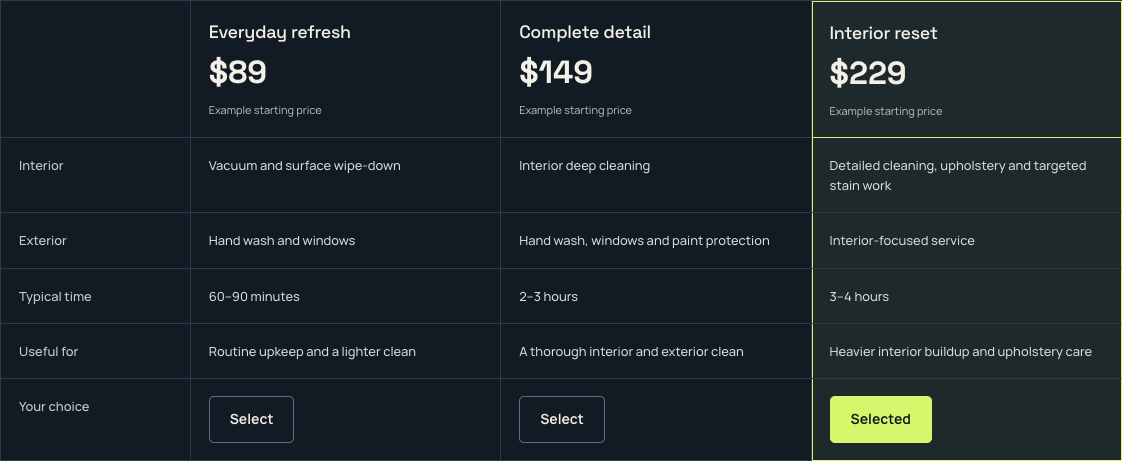
Screenshot of the live fictional comparison, captured October 25, 2026. View the comparison screenshot at full size.
3. Carry forward
Illustrative request summary
- Selected service
- Interior reset
- Priority
- Deeper interior care
- Example starting price
- $229 — subject to scope review
- Additional requirement
- Upholstery care after a muddy trip.
Customer reviews and edits before submitting.
Illustration of a connected request, not a booking, submitted inquiry or screenshot of a live handoff.
Ask for the right information at the right time
A useful interface does not need to display every possible question at once. It can start with the essentials and reveal further details when they become relevant. This is the idea behind progressive disclosure: prioritize the commonly needed options while keeping additional detail accessible.
Use buttons for clear choices and allow free text when someone needs to explain an unusual situation. Keep important costs, exclusions, and commitments visible before the customer acts.
Reusing information also matters. W3C guidance addresses avoiding redundant entry within the same process, with exceptions such as security requirements or information that is no longer valid. Remembering a selection during an inquiry does not require silently creating a permanent customer profile.
How does this help the business?
The aim is more useful progress: customers understanding their options, completing requests, and giving your team enough information to respond.
That can mean fewer abandoned forms, fewer clarification emails, and more suitable inquiries. It may also help your team handle requests more efficiently. Those are outcomes to measure, not automatic results from adding an interactive tool.
Track completed inquiries alongside their quality. A shorter form that generates more unusable messages has not necessarily improved the process. Look at completion time, errors, missing details, and the follow-up needed before the business can help.
When a simple form is enough
If you offer one straightforward service with a clear price and few decisions, better wording and a simple contact form may be all you need. Adding a configurator or chatbot could create unnecessary work.
Start with a real obstacle. Keep navigation predictable, explain recommendations, preserve edits, and give people a direct way to contact you when the guided flow does not fit.
A five-question check for your website
- Can customers tell which service fits their needs?
- Are they asked to enter anything more than once?
- Can they review and change their choices?
- Is the next step, including any commitment, clear?
- Does your business receive enough information to respond usefully?
Try completing that journey on your phone. Ask someone unfamiliar with your business to do the same, and watch where they hesitate. That is a practical starting point for deciding what to improve.
See what a connected experience could look like
Explore the examples in our playground. Then tell us where customers get stuck on your website, whether it is choosing a service, preparing a request, or understanding what happens next.