Blog / Website planning
Is Your Website Ready for the Season?
Your business changes every few months. Your website probably hasn’t changed since it launched. Here’s how a seasonal website can put the right services, look, and message first.

By Zack Lekas · · 10 min read
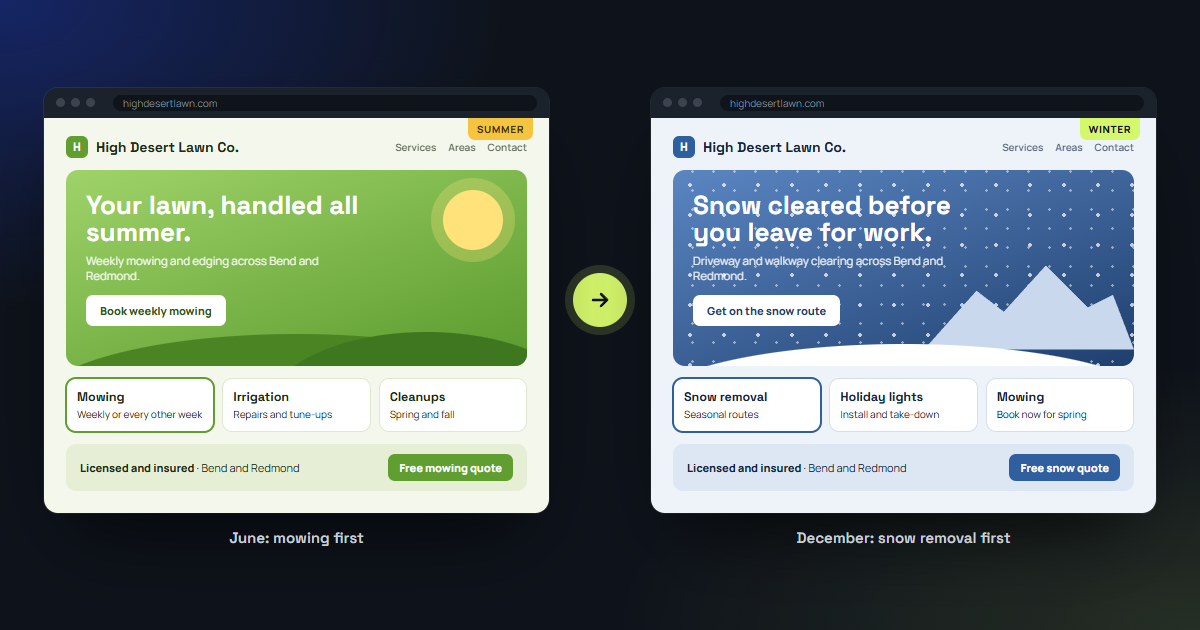
It’s November in Central Oregon. There’s frost on the windshield, a snow shovel by the door, and a landscaping website somewhere in Bend still showing a sunny photo of a freshly mowed lawn with a big button that says “Book your spring cleanup.”
Nobody is booking a spring cleanup. Half of Bend is looking for someone to clear their driveway.
Your business changes with the seasons. The services you sell change, the questions customers ask change, and the thing you most want people to see changes too.
Most websites don’t change at all. They launch, they look good, and then they sit there for three years like a holiday decoration nobody took down.
It doesn’t have to work that way.
TL;DR
Short on time? Here’s the whole idea before your coffee goes cold.
- Your website can change with the season: the look, the headline, and the order of what customers see first can switch automatically on dates you choose.
- Campaigns can take over too: running a fall aeration special or a holiday gift card promo? The homepage can reorder itself around it, then switch back when it ends.
- Seasonal businesses benefit most: landscapers, snow removal, rentals, outdoor recreation, and anyone whose busy season moves around the calendar.
- It doesn’t have to hurt your SEO: your service pages stay put year-round. What changes is the emphasis.
- You don’t log in four times a year: changes are planned once and happen on schedule.
What a seasonal website actually is
A seasonal website is a site built to change with your business instead of staying frozen in the month it launched.
That can mean a few different things:
- The theme changes. Warm greens and sunshine in summer, cooler colors and snowy photos in winter. It’s not about being cute. It tells visitors your business is active right now and paying attention.
- The messaging changes. The headline, the main button, and the short description at the top of your homepage match what customers are thinking about this month.
- The order changes. This is the part most people don’t think about. Your website can rearrange itself so the services people need right now show up first, and the ones that are out of season move further down.
Think of it like the front window of a store. A good shop doesn’t keep beach towels in the window in December. Everything is still inside, but what’s out front matches what people are walking in for.
Your homepage is your front window. Most people decide in a few seconds whether they’re in the right place. If the first thing they see is a service you aren’t even offering right now, a lot of them will leave before they find the one you are.
The problem with a website that never changes
Here’s what usually happens with a seasonal business and a “set it and forget it” website.
A landscaping company in Redmond gets a nice website built in April. The homepage leads with mowing, edging, and spring cleanups. Great timing.
By October, the business is doing leaf removal, aeration, and winterizing irrigation systems. The website still leads with mowing.
By December, the owner is plowing driveways and putting up holiday lights. The website still leads with mowing.
Customers who land on that homepage in winter have to scroll, hunt, and guess whether the company even does snow removal. Some will find the page. Plenty won’t, and they’ll call the next company in the search results instead.
The owner usually knows the website is out of date. But updating it means logging in, remembering how the editor works, rewriting sections, swapping photos, and hoping nothing breaks. During the busy season, that’s at the bottom of a very long list.
So it doesn’t happen.
Campaign mode: when you want one thing front and center
Seasons aren’t the only reason to change what customers see first.
Sometimes you’re running a specific campaign:
- A fall aeration special for the first two weeks of October
- Early booking discounts for spring maintenance contracts
- Holiday gift cards for a restaurant or salon
- A summer camp registration window
- A grand opening for a second location in Sisters
- A Facebook or Google ad pointing at one specific service
During a campaign, you want that offer to be the first thing people see. Not buried on a “Specials” page three clicks deep. Not mentioned in a tiny banner nobody reads.
A website built for campaigns can switch into that mode on the start date. The homepage leads with the offer, the main button points to the right form, and related services move up. When the campaign ends, the site switches back on its own. No leftover “Limited time offer!” banner still running in March. (We’ve all seen one. It’s a little sad.)
My own homepage does a small version of this. The banner for my website giveaway sits at the top while entries are open and removes itself after the closing date. I never have to remember to take it down.
Campaigns can also match where people came from. If someone clicks your snow removal ad, they can land on a homepage that leads with snow removal, even if the rest of your visitors see something else that week. The person who clicked the ad sees exactly what the ad promised, which is a big part of whether ads pay for themselves.
Who this helps most
Almost any business has slow months, busy months, and things it wants to promote at certain times. But some businesses get much more out of a website that moves with them.
Landscapers and yard care. Spring cleanups, summer mowing, fall leaves and aeration, winter snow removal or holiday lighting. Four seasons, four very different homepages.
Snow removal and property maintenance. Your busiest season is short and intense. Your website should be ready before the first storm, not after. If you’re thinking about winter work, my post on winter marketing for service businesses covers the rest of the plan.
Vacation rentals. A cabin in Sunriver sells a completely different trip in July than in January. Summer means river floats and bike trails. Winter means Mt. Bachelor and a fireplace. The photos, the headline, and the first things guests see should match the trip they’re planning.
Outdoor recreation and tours. Paddleboard rentals, ski tuning, fishing guides, bike shops. Your inventory and your customers change with the weather.
Restaurants, breweries, and coffee shops. Seasonal menus, patio season, holiday parties, gift cards. The homepage can lead with whatever you want people to know about right now.
Contractors and home services. HVAC companies lead with cooling in summer and heating in winter. Roofers lead with inspections before winter storms. Window and gutter companies have their own seasons too.
Retail and gift shops. Holiday shopping, summer tourists, back-to-school. Different people walk through the door at different times of year.
If your business has a calendar that looks anything like Central Oregon’s weather, this probably applies to you.
How it works without more work for you
The idea of a website that changes four times a year might sound like four times the work.
It shouldn’t be.
When I build a seasonal website, we plan the seasons and campaigns once, usually during the original build:
- List your seasons. What do you sell, and when? Most businesses have two to four.
- Decide what leads each season. Which services go first, what the headline says, what the main button does.
- Pick the look. Colors and photos for each season. Your logo, fonts, and overall brand stay consistent so it still feels like the same business.
- Set the dates. The site switches on the dates you choose. Late October to winter, early March to spring, whatever matches your actual business.
- Add campaigns as they come up. A new promotion is a short request, not a redesign.
After that, the website does the switching. You don’t have to log in at 11 p.m. on October 31st to change your homepage.
And because the seasonal versions are planned ahead of time, you can review them before they go live instead of discovering in January that your winter page still has a typo in it.
Keeping Google happy while your site changes
A fair question: does changing your website all the time hurt your search rankings?
Not if it’s done carefully. Here’s the approach I use:
- Service pages stay published year-round. Your snow removal page doesn’t disappear in June, and your lawn care page doesn’t disappear in January. Pages that come and go lose the search rankings they’ve built up. Instead, an out-of-season page can say something like “Booking for next winter opens in October” and offer a way to get on the list.
- Addresses don’t change. Your page URLs stay the same, so links from Google, your Google Business Profile, and other websites keep working.
- The core information stays put. Business name, phone number, service area, and hours are consistent no matter what season it is.
- Emphasis changes, content stays. The homepage reorders and the headline changes, but the information search engines rely on is still there.
Seasonal updates can actually help. A homepage that mentions snow removal in Bend during the months people search for it gives search engines a clear signal about what you’re offering right now. If you want the bigger picture, my post on how to improve your SEO goes through the basics.
A few things to get right
Changing your website with the seasons works best when you keep a few guardrails in place.
Don’t change everything. Your logo, your name, and your overall style should stay recognizable. The goal is a business that looks current, not one that looks like five different companies.
Keep navigation familiar. Returning customers should still find the same menu in the same place. Reorder what’s on the homepage, not how the whole site is organized.
Use real photos when you can. A photo of your actual crew clearing an actual driveway in Redmond beats a stock photo of a snowman every time.
Plan the switch before the season, not during it. The best time to get your winter homepage ready is September. The second best time is right now.
Don’t overdo the decorations. A hint of the season is plenty. Your website doesn’t need falling snowflakes covering the phone number. (Please don’t make your customers squint through a blizzard to call you.)
Common questions about seasonal websites
Can my website change automatically with the seasons?
Yes. A website can be built to switch its theme, headline, and page order on dates you set ahead of time. Once the seasons are planned, the changes happen on schedule without anyone logging in to make them.
Will changing my website for each season hurt my SEO?
Not when it’s done carefully. Keep your service pages published year-round, keep your page addresses the same, and change the emphasis on your homepage rather than deleting content. Seasonal changes can help by making it clear what you offer at the time people are searching for it.
Can I add a seasonal theme to my existing website?
Sometimes. It depends on how your current site is built. Some websites can be updated to support seasonal changes, and others would need to be rebuilt. If you’re not sure, my post on when to redesign your business website can help you think through it, or I can take a look at your current site.
How much does a seasonal website cost?
It depends on how many seasons and campaigns you need and how different each version is. Planning seasonal versions during the original build costs much less than adding them later. You can estimate a website on the pricing page or read my breakdown of what a small business website costs.
Can the website show different things to people who click my ads?
Yes. A visitor who clicks a specific ad can land on a version of your homepage that leads with that same offer. It helps people find exactly what the ad promised, which usually means more of them follow through.
Is your website ready for the season?
Take a quick look at your homepage right now and ask yourself one question:
If a new customer landed here today, would the first thing they see be something you actually want to sell them this month?
If the answer is “well, after they scroll a bit,” it might be time for a website that keeps up with your business.
I build custom websites for Central Oregon businesses in Bend, Redmond, Sisters, Sunriver, and the surrounding area, including sites that change with your seasons and campaigns and put the right services in front of the right customers at the right time. You can see a small version of the idea on my homepage, where picking a business type rearranges the tools shown below it. If you’re new to the idea of websites that adapt to the visitor, what is intelligent UI explains the bigger picture.
Your business changes every few months. Your website can keep up.
All postsNext: Don't Let Your Customers Hibernate: How to Keep Your Service Business Busy This Winter